
I run a Raspberry Pi in my unheated garage, wired to a garage door controller via Z-Wave. No monitor, no keyboard — just SSH. So when a botched OS upgrade killed SSH, I had to get creative.
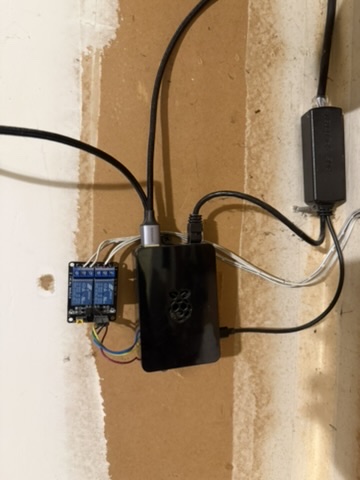
The Setup
The Pi was running Raspbian Buster (Debian 10) with Docker containers, and I was upgrading it to Bookworm (Debian 12). A two-generation leap across Buster → Bullseye → Bookworm.
What Went Wrong
During the Bullseye-to-Bookworm upgrade, the first apt-get upgrade failed because Bullseye’s dpkg (1.20.x) doesn’t support zstd-compressed .deb packages that Bookworm uses. To bootstrap the new dpkg, I force-installed Bookworm’s libc6 (2.36) alongside the new dpkg (1.22.6):
dpkg --force-depends --force-breaks -i locales_*.deb libc6_*.deb dpkg_*.debThis upgraded libc6 from 2.28 (Buster) to 2.36 (Bookworm) — and immediately broke the running openssh-server (7.9p1, from Buster). The old sshd binary was incompatible with the new libc6. SSH connections would complete key exchange but then immediately close:
debug1: SSH2_MSG_SERVICE_ACCEPT received
... connection closed
The Pi was now unreachable via SSH.
The Lifeline: A Privileged Docker Container
Two Docker containers were still running on the Pi: zigbee2mqtt (not privileged) and zwavejs2mqtt (privileged, with host networking). The zwavejs2mqtt container (Z-Wave JS UI) runs with --privileged and --network=host, exposing a Socket.IO API on port 8091 that includes a driverFunction method — designed for custom Z-Wave driver code, but it evaluates arbitrary JavaScript via new Function().
Getting Shell Access
The driverFunction eval context doesn’t have require() (it’s a bundled ES module context). Neither require nor process.mainModule.require worked. But process.binding('spawn_sync') is available — a low-level Node.js internal that directly invokes posix_spawnp:
const ss = process.binding('spawn_sync');
const r = ss.spawn({
  file: '/bin/sh',
  args: ['/bin/sh', '-c', 'id && hostname'],
  envPairs: ['PATH=/usr/sbin:/usr/bin:/sbin:/bin'],
  stdio: [
    { type: 'pipe', readable: true, writable: false },
    { type: 'pipe', readable: false, writable: true },
    { type: 'pipe', readable: false, writable: true }
  ]
});
const stdout = Buffer.from(r.output[1]).toString();
// uid=0(root) gid=0(root) — running as root in privileged container
Accessing the Host Filesystem
The privileged container can mount the host’s root partition:
mkdir -p /host_root
mount /dev/mmcblk0p2 /host_root
mount --bind /proc /host_root/proc
mount --bind /sys /host_root/sys
mount --bind /dev /host_root/dev
mount --bind /run /host_root/run
cp /etc/resolv.conf /host_root/etc/resolv.conf
Now chroot /host_root gives a full host environment.
The Fix (Three Rounds)
Round 1: dpkg-deb Is Broken Too
First attempt: run dpkg --configure -a && apt-get -f install in the chroot. Failed because the new dpkg (1.22.6) depends on dpkg-deb, which links against liblzma5 >= 5.4.0. The system still had Bullseye’s liblzma5 (5.2.5):
dpkg-deb: /lib/arm-linux-gnueabihf/liblzma.so.5: version 'XZ_5.4' not foundThis meant dpkg couldn’t unpack any .deb files at all — a chicken-and-egg problem.
Round 2: Manual Library Extraction with ar + tar
The solution was to bypass dpkg-deb entirely. .deb files are ar archives containing a data.tar.xz. I could extract the library files directly:
# Download the .deb files (apt-get download still works)
chroot /host_root sh -c 'cd /tmp && apt-get download liblzma5 libzstd1'

# Extract using ar + tar inside the chroot
chroot /host_root sh -c '
  cd /tmp
  ar x liblzma5_*.deb
  xz -d data.tar.xz && tar xf data.tar -C /
  rm -f data.tar* control.tar* debian-binary
'

# Same for libzstd1, then register the new libraries
chroot /host_root ldconfig
After this, dpkg-deb --version worked again. Key detail: ar was not available inside the container (Alpine-based), but it was available on the host via chroot /host_root.
Round 3: Fix openssh-server
With dpkg-deb working, I could now install packages normally:
chroot /host_root sh -c '
  cd /tmp
  apt-get download openssh-server openssh-client openssh-sftp-server libssl3 mawk
  dpkg --force-depends --force-confold -i
    mawk_*.deb openssh-client_*.deb openssh-sftp-server_*.deb
    openssh-server_*.deb libssl3_*.deb
'
chroot /host_root dpkg --configure openssh-server
The mawk package was needed because openssh-server’s post-install script uses ucf, which requires awk.
Reboot
sync
umount /host_root/dev/pts /host_root/run /host_root/dev /host_root/sys /host_root/proc
umount /host_root
sync
echo b > /proc/sysrq-trigger
After reboot, SSH worked:
$ ssh pi@garage.home
Linux garage 5.10.103-v7+ #1529 SMP Tue Mar 8 12:21:37 GMT 2022 armv7l

$ dpkg -l openssh-server | grep openssh
ii  openssh-server 1:9.2p1-2+deb12u7 armhf  secure shell (SSH) server
The Dependency Chain That Broke Everything
dpkg 1.22.6 (Bookworm)
  → dpkg-deb
    → liblzma5 >= 5.4.0 (system had 5.2.5)
    → libzstd1 >= 1.5.2 (system had 1.4.8)

openssh-server 7.9p1 (Buster)
  → libc6 (linked against 2.28 ABI)
  → BROKEN when libc6 upgraded to 2.36

Fix order:
  1. Extract liblzma5 5.4.1 manually (ar + tar)
  2. Extract libzstd1 1.5.4 manually (ar + tar)
  3. ldconfig
  4. dpkg-deb now works
  5. Install libc-bin 2.36 via dpkg
  6. Install mawk (awk provider)
  7. Install openssh-server 9.2p1 via dpkg
  8. Reboot
Lessons Learned
- Never upgrade libc6 without upgrading openssh-server in the same transaction. The old sshd binary is immediately incompatible with the new libc.
- A privileged Docker container is a backdoor. If you have a privileged container with host networking, you have root access to the host. This saved the day here, but it’s also why you should minimize privileged containers.
process.binding('spawn_sync')bypasses Node.js sandboxing. Even whenrequire()is unavailable in an eval context, low-level process bindings provide shell access.ar+tarcan replacedpkg-deb. When dpkg itself is broken, you can manually extract.debfiles to bootstrap the package manager.- Debian major version upgrades are fragile. Unlike Ubuntu’s
do-release-upgrade(which runs a backup sshd on port 1022), Debian has no safety net. If SSH breaks mid-upgrade, you need physical access — or a creative workaround. - Keep a privileged container running during remote OS upgrades. It might be your only way back in.